
Inventory Plus1.5.2 - Google Play
Please wait ... The app listing is being verified for availability.
You'll be able to see results in few seconds.
You'll be able to see results in few seconds.
Publisher Description


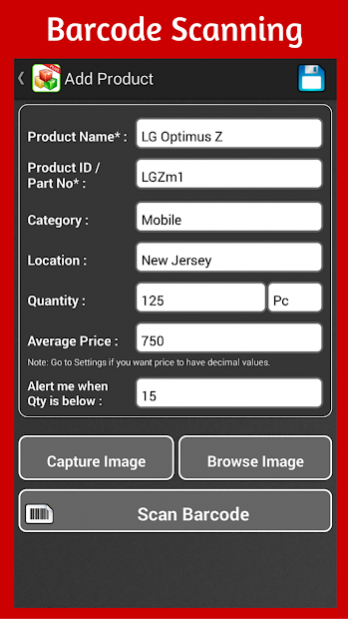
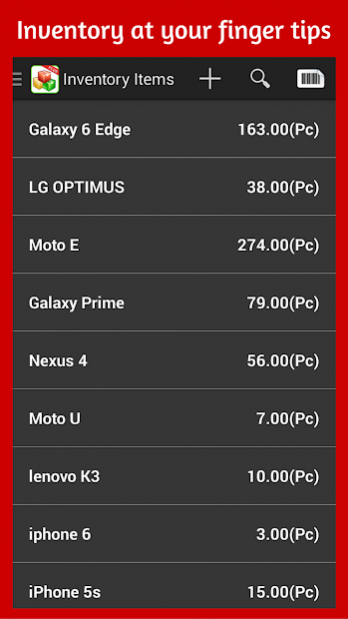
Major Modules:
1) Inventory Management
2) Purchase Order, Sales Order (Email / SMS Orders from mobile)
3) Barcode Scanning
4) Suppliers, Customers
5) Import Data, Export Data, automatic data backup (in-app purchase)
6) Extensive Reporting
7) Income and Expense Management
This App provides stock-taking and inventory management in most simplistic way. Be it for your home inventory or for the business inventory; it will help you easily track your inventory. It also helps in managing purchase orders and sales orders. You can send those to suppliers or customers. Do your income and expense management along with inventory management. So, it is a complete app to run your business from mobile or your home inventory.
- Record your inventory data in a minimalistic manner
- Maintain stock IN / OUT movements and get extensive reporting on that
- Receive low inventory alerts by emails or in-app notifications
- Barcode search and direct item addition
- Run stock-taking for your inventory and get variance reporting
- Create purchase orders; and email or SMS them to suppliers instantly
- Record delivery of purchase orders. That will increase your inventory automatically
- Create sales orders; and email or SMS them to customers instantly
- Record delivery of sales orders. That will reduce your inventory automatically
- Export / import your inventory data in Excel/CSV and setup daily/weekly/monthly auto-back up of your data (in-app purchase)
- Store the location and image of the inventory items
- Know your inventory valuation in real time, which is auto-calculated using weighted average inventory valuation method
- Get extensive reporting: Inventory valuation report, Purchase Order Report, Sales Order Report, Supplier /Customer report, Location report, Daily/Monthly/Date Range Inventory transactions, .....
- Export all reports to excel and get them in email (in-app purchase)
As a retailer, you need to keep track of your inventory, need to organize it and know when to replenish it. Instant Inventory App allows you to keep detailed records of your inventory on your mobile device as well as update stock movement in real time. Create, manage or control your item stock lists, scroll of articles, part lists, equipment serial numbers, physical or fixed assets etc. in no time at all. Reporting module offers a handful of reports to meet your reporting needs. The alert system raises alerts if the inventory is below permissible quantity.
Feel free to contact us via email. We have excellent support record and no questions will be ignored – inventory.plus@billionhands.in
Official Website: http://www.billionhands.in/InventoryPlus.html
Download app now & manage inventory on your fingertips.
About Inventory Plus
Inventory Plus is a paid app for Android published in the PIMS & Calendars list of apps, part of Business.
The company that develops Inventory Plus is Billion Hands Technology. The latest version released by its developer is 1.5.2.
To install Inventory Plus on your Android device, just click the green Continue To App button above to start the installation process. The app is listed on our website since 2019-03-04 and was downloaded 0 times. We have already checked if the download link is safe, however for your own protection we recommend that you scan the downloaded app with your antivirus. Your antivirus may detect the Inventory Plus as malware as malware if the download link to in.billionhands.inventoryplus is broken.
The company that develops Inventory Plus is Billion Hands Technology. The latest version released by its developer is 1.5.2.
To install Inventory Plus on your Android device, just click the green Continue To App button above to start the installation process. The app is listed on our website since 2019-03-04 and was downloaded 0 times. We have already checked if the download link is safe, however for your own protection we recommend that you scan the downloaded app with your antivirus. Your antivirus may detect the Inventory Plus as malware as malware if the download link to in.billionhands.inventoryplus is broken.
How to install Inventory Plus on your Android device:
- Click on the Continue To App button on our website. This will redirect you to Google Play.
- Once the Inventory Plus is shown in the Google Play listing of your Android device, you can start its download and installation. Tap on the Install button located below the search bar and to the right of the app icon.
- A pop-up window with the permissions required by Inventory Plus will be shown. Click on Accept to continue the process.
- Inventory Plus will be downloaded onto your device, displaying a progress. Once the download completes, the installation will start and you'll get a notification after the installation is finished.
Program Details
System requirements
Operating systems
Android
Download information
File size
3.8 MB
Total downloads
0
Pricing
License model
Paid
Price
Version History
Here you can find the changelog of Inventory Plus since it was posted on our website on 2016-11-05. The latest version is 1.5.2 and it was updated on Apps112 on 07 October, 2026. See below the changes in each version:
version 1.5.2
posted on 2019-03-04
- Improvements for Android Pie
version 1.1
posted on 2016-06-16
- Added Customer / Supplier search from their respective list pages.
Disclaimer
Official Google Play Link
We do not host Inventory Plus on our servers. We did not scan it for viruses, adware, spyware or other type of malware. This app is hosted by Google and passed their terms and conditions to be listed there. We recommend caution when installing it.
The Google Play link for Inventory Plus is provided to you by apps112.com without any warranties, representations or guarantees of any kind, so access it at your own risk.
If you have questions regarding this particular app contact the publisher directly. For questions about the functionalities of apps112.com contact us.
